How I deployed and hosted my website
March 15, 2023 · Updated: February 19, 2026
1. Buy a domain
Depending on your desired domain, there are a lot of domain hosting like Google Domains, AWS Route 53, GoDaddy, etc. I bought my .dev domain at Google Domains but since transferred to porkbun.com.
2. Build your website
I don’t want to build my website from scratch and I am a backend developer so front-end is not my forte. To build this website:
- I used Gatsby initially using the theme gatsby-starter-minimal-blog - gatsbyjs.com by LekoArts.
- But migrated to Hugo - gohugo.io and PaperMod - github.com by adityatelange.
- As of Feb 2026, I rebuilt the website using Astro and Tailwind CSS. Theme is custom.
3. Host your website
To host my website, I used AWS Amplify. It’s almost free and with less than a dollar bill each month.
3.1 Choose source code provider
In AWS Amplify, choose Github and click Next. Connect your github account.
3.2 Add repository and branch
Choose the repository and branch of your project then click Next.
3.3 App settings
To build the website, update the amplify.yaml. Click Edit YML file, copy the content below and click Save.
version: 1
frontend:
  phases:
    preBuild:
      commands:
        - nvm use 22
        - node --version
        - npm ci
    build:
      commands:
        - npm run build
  artifacts:
    baseDirectory: dist
    files:
      - '**/*'
  cache:
    paths:
      - node_modules/**/*
3.4 Review
Review the details then click Save and deploy. Your app will be automatically built and deployed after 3-5 minutes.
4. Configure your DNS to point to AWS Amplify
4.1 Configure custom domain
In AWS Amplify, click on your app. Under Hosting > Custom domains, click Add domain. Type your root domain, choose Manual configuration and click Configure domain. Click on Actions dropdown and click View DNS records.
4.2 Copy DNS records
In your domain console management, copy the DNS record details to your domain’s DNS records.
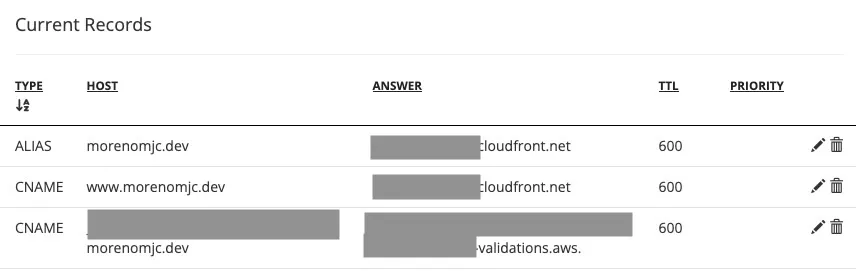
Wait for DNS and SSL configuration and your website should be accessible from your domain after 5-10 minutes.
5. Add post and git push
Every time you push to your main branch, AWS Amplify will automatically deploy your website. How convenient!